. .
..
iRecord and iRecord Pro Personal Media Recorder for iPod, PSP, 3G iphone, iPod touch, MP3 player, USB drives, Mobile iRecord and iRecord Pro Personal Media Recorder for iPod, PSP, 3G iphone, iPod touch, MP3 player, USB drives, Mobile iRecord and iRecord Pro Personal Media Recorder for iPod, PSP, 3G iphone, iPod touch, MP3 player, USB drives, Mobile iRecord and iRecord Pro Personal Media Recorder for iPod, PSP, 3G iphone, iPod touch, MP3 player, USB drives, Mobile
 
.

.

.
. . .


  .....  
iRecord Pro  

Video Demos

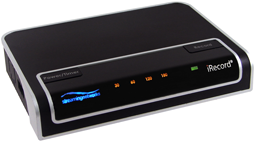
iRecord Pro is the next generation of iRecord. In addition to iRecord’s existing features, iRecord Pro introduces a number of other functionalities, such as direct recording to 3G iPhone*, iPhone*, iPod® touch*, Blackberry, Mobile phones, PSP, Walkman, USB flash & hard drive, high resolution H.264 recording, direct recording to PC/Mac®, Streaming, MPEG-2/MPEG-1 transcoding, duration recordings, schedule recordings & lossless audio recording.

Hook up your iRecord Pro to a TV, DVD/CD player, DVR, VCR, Cassette player, STB or any other analog video source, press iRecord’s record button and your favorite show will record directly


iRecord Pro Personal Media Recorder


How to record from a DVD

iRecord Demos


How to transfer data from iPod to iTunes

iRecord Demos


How to Update iRecord Firmware

iRecord Demos


How to connect A/V cables

iRecord Demos

 
. . .

How to update iRecord Pro firmware

iRecord Demos


*
Direct recording is supported upto firmware version 2.1.1. iRecord Pro users wanting to continue availing this  ...feature are requested not to upgrade their iPhone firmware to recently released 3.0 until iRecord Pro firmware  ...upgrade is announced for it.


     iRecord Pro allows you to record videos at higher resolutions such as:

  • Full D1 (720x480/576) at 30/25 frames per second

  • VGA (640x480) at 30/25 frames per second

  • iPhone native resolution (480x320) at 30/25 frames per second

  • PSP native resolution (480x272) at 30/25 frames per second

  • QVGA(320x240) at 30/25 frames per second

  • Records from any analog video source including DVD/CD player, TV, DVR, TiVo®, VCR, or any cable/satellite set-top box


  • iRecord Pro lets your capture, analog A/V signal directly to your PC/Mac in H.264 format

  • The captured contents can be previewed on the local or streamed to other computers

  • iRecord Pro lets you record your music directly to your PC/Mac (MP3/AAC/WAV)

  • PC/Mac recording requires an iRecord Desktop software, which is available free of cost from iRecord website

  • Remote computers can watch the streamed contents via QuickTime

  • iRecord Desktop also allows you to schedule your recordings at a particular time and configure recording parameters such as bit rate, resolution, codec etc


iRecord Pro converts MPEG-2/MPEG-1 contents to MP4 format, that is playable on variety of portable media players. iRecord Desktop facilitates the transcoding process. iRecord Desktop provides two modes of transcoding:

1. PC/Mac based transcoding
2. Standalone transcoding


With standalone mode, you can attach the disk containing MPEG-2 files with iRecord Pro, and let the iRecord convert them for you without PC/Mac involvement.


iRecord Pro is equipped with timer buttons. Using these buttons you can specify the recording duration. Following time duration are available:

  • 30

  • 60

  • 120

  • 180

      The timer LEDs on the unit indicate the remaining time left for the recording.


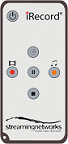
iRecord Pro comes with a Remote Control with keys to:

  • Start video or audio-only recording

  • Pause recording

  • Stop recording

  • Set recording durations 30, 60, 120, 180 minutes


            Get In Touch
 
  Leave a Message:
for more
information
.


Testimonial:
let the world know
what you think of
iRecord
.


Subscribe:
to all the latest
iRecord news,
reviews, updates.


  Copyright © 2000-2009 Streaming Networks, Inc.                                                                                                Legal  |  Contact