|
|
Free Movies
To iPhone
|
..... |
|
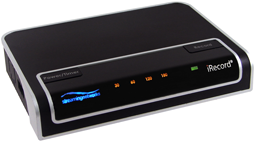
iRecord Pro records
Free movies to iPhone, Free
movies to iPhone, Free movies to iPod from your TV, Dvd, CD, LP,
Cassette player, radio, Set-up-box or any Analog source directly without
a computer.
It
enables you to enjoy Free music, Free videos and Free movies - on almost any
device. Simply connect iRecord Pro to a TV, cable or satellite
box to record favorite programs; or connect to a DVD Player, TiVo®, or
VCR to copy existing videos to a number of portable media player.
iRecord Pro connects to video cameras, computers or game consoles to
encode web-ready high quality H.264 video and MP3, AAC, WAV or FLAC
audio in real-time.
All models of iRecord Pro support features given below: |
|
Buy iRecord Pro Now |
|
|
| |
| |
| |
| |
| |
| |
| |
| |
|
|
|
iRecord Pro allows you to record videos at higher
resolutions such as:
-
Full D1
(720x480/576) at 30/25 frames per second
-
VGA
(640x480) at 30/25 frames per second
-
iPhone
native resolution (480x320) at 30/25 frames per second
-
PSP native
resolution (480x272) at 30/25 frames per second
-
QVGA(320x240) at 30/25 frames per second
-
Records
from any analog video source including DVD/CD player, TV, DVR, TiVo®,
VCR, or any cable/satellite set-top box
-
iRecord Pro
lets your capture, analog A/V signal directly to your PC/Mac in H.264
format
-
The captured
contents can be previewed on the local or streamed to other computers
-
iRecord Pro
lets you record your
Free
movies,
Free
videos,
Free music directly to your PC/Mac
-
PC/Mac
recording requires an
iRecord Desktop
software, which is available free of cost from iRecord website
-
Remote
computers can watch the streamed contents via QuickTime
-
iRecord
Desktop also allows you to schedule your recordings at a particular time
and configure recording parameters such as bit rate, resolution, codec
etc
iRecord Pro
converts MPEG-2/MPEG-1 contents to MP4 format, that is playable on variety
of portable media players. iRecord Desktop facilitates the
transcoding process. iRecord Desktop provides two modes of transcoding:
1. PC/Mac based transcoding
2. Standalone transcoding
With standalone mode, you can attach the disk containing MPEG-2 files with
iRecord Pro, and let the iRecord convert them for you without PC/Mac
involvement.
iRecord Pro is
equipped with timer buttons. Using these buttons you can specify the
recording duration. Following time duration are available:
The timer LEDs on the unit indicate the remaining time left for the
recording.
|
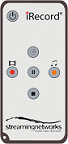
iRecord
Pro comes with a Remote Control with keys to:
-
Start video
or audio-only recording
-
Pause
recording
-
Stop
recording
-
Set
recording durations 30, 60, 120, 180 minutes
|
 |
|
| |
| |
| |
| |
| |
| |
| |
| |
| |
| |
| |
| |
| |
| |
| |
| |
| |
| |
| |
| |
| |
| |
| |
| |
| |
| |
|
|